You check your playlist and the save count has jumped again twenty, fifty, maybe a hundred more people added it since last week.
It’s a good feeling, and it naturally leads to one question: who actually saved it? A friend? A stranger who found it through search? Someone who shared it in a group chat?
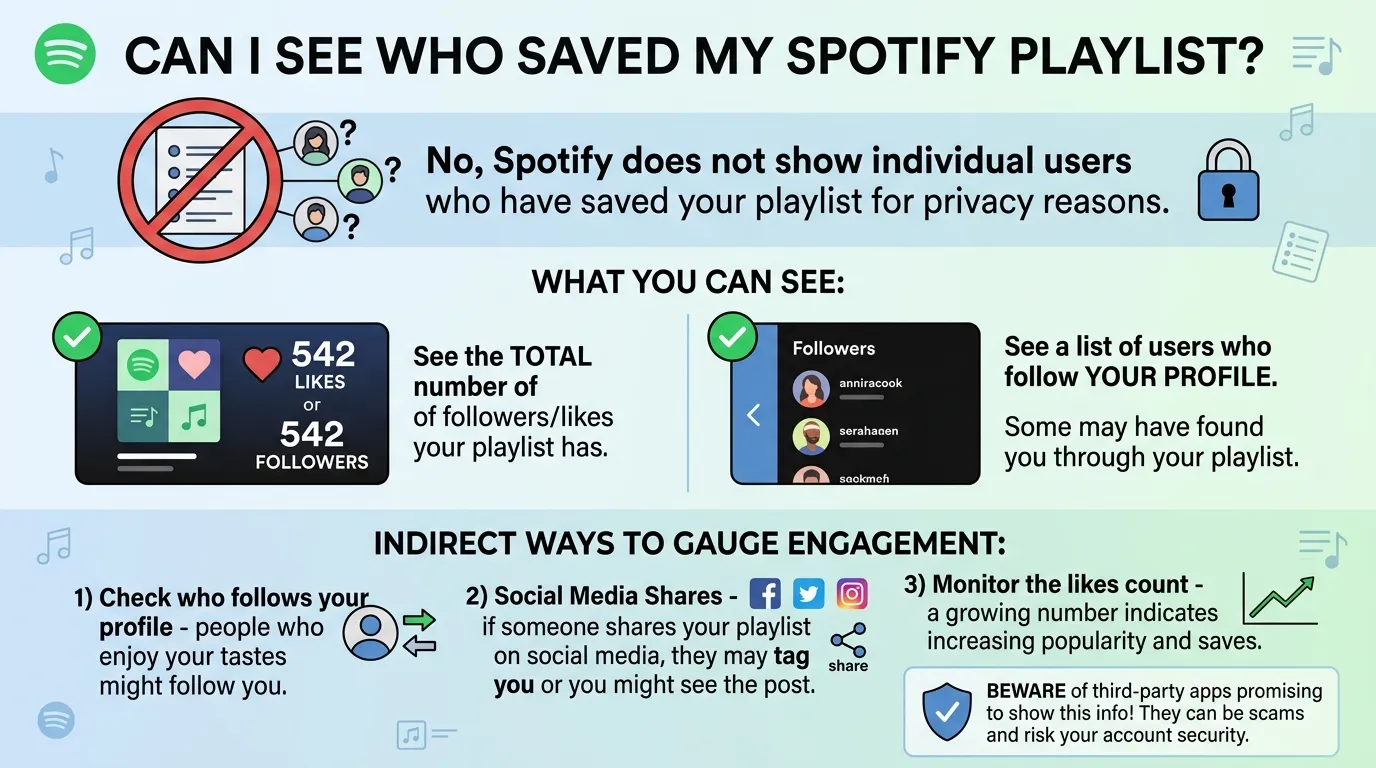
Here’s the honest answer up front: Spotify doesn’t let you see individual names. No list of usernames, no profiles, no way to click the save count and find out who’s behind it and that’s true whether you’re a casual playlist maker or a verified artist with millions of streams.
But that doesn’t mean the save count is meaningless, or that you’re stuck with zero insight. This guide breaks down exactly what Spotify does show you, why individual identities stay hidden, and how to actually gauge whether people care about what you’re curating.
The Direct Answer: What Spotify Does and Doesn’t Show
Let’s get straight to it: you cannot see who saved your Spotify playlist. Not a partial list, not a hidden menu, not something buried in settings. Spotify simply doesn’t expose that data to playlist owners full stop.
This holds true no matter who you are. A casual user with a 20-song playlist and a verified artist with a label behind them get the exact same limitation. Spotify doesn’t make exceptions for larger accounts, paid subscriptions, or professional artist tools. If the feature doesn’t exist for anyone, it doesn’t exist for you either regardless of how big your playlist gets.
What you are given is a single aggregate number. Open any playlist you created, and near the title and cover art you’ll see a save or follower count. That number updates in real time and reflects the total number of people who’ve added your playlist to their library. It’s public-facing, easy to find, and the only genuine engagement metric Spotify hands you at the playlist level.
This applies consistently across every version of the app mobile, desktop, and the web player all show the same limitation and the same aggregate count. There’s no secret menu on one platform that unlocks more detail than another. Wherever you check, the answer is the same: a number, not a name.
Key Terminology Breakdown
Part of the confusion around this topic comes from how loosely people use terms like “saved,” “liked,” and “followed.” Spotify’s own language doesn’t always make the distinctions obvious, so it’s worth breaking each one down before going further.
Saved vs. Liked Playlist
These are the same action wearing two different names. When someone adds your playlist to their library whether they call it “saving” or “liking” it it’s a single action counted the same way. There’s no separate metric for one versus the other.
Playlist Follower vs. Playlist Save
This is another pair that trips people up. “Following” a playlist and “saving” a playlist are functionally identical both add it to the user’s library, and both count toward the same total. So when you see a follower count on a playlist, you’re looking at the save count under a different label.
Profile Follower
This one’s genuinely different, and it’s the one exception to the privacy rule. If someone follows your curator or artist profile not just a single playlist, but you as an account that’s public. You can see a list of the profiles following you. A profile follow, however, doesn’t tell you which of your playlists (if any) that person actually saved.
Playlist Listener
Streaming a playlist and saving it are two separate behaviors entirely. Someone can listen to your playlist from start to finish without ever saving it, and that listening activity isn’t reflected in your save count at all. Plays and saves are tracked separately, and only the save/follower total is visible to you.
Collaborative Playlist Participants
If you’ve set up a collaborative playlist, Spotify does show you who’s been added as a collaborator those are visible, named accounts with edit access. But this is a fundamentally diffeent feature from playlist saving. Collaborators are people you’ve explicitly invited to contribute; savers are anyone who added the playlist to their library, and that second group stays anonymous no matter what.
Keeping these terms straight matters because it’s easy to assume that because one form of “following” is public (profile followers), all forms should be. They’re not and knowing exactly which metric is which will save you from chasing a feature that doesn’t apply to what you’re actually trying to check.
Why Spotify Hides This Data
It’s natural to assume this is just a missing feature Spotify hasn’t gotten around to building. In reality, it’s a deliberate choice and one with a fairly long history behind it.
A Privacy-First Design Choice
At its core, hiding individual save data is about protecting user privacy. Letting playlist owners see exactly who saved their playlist would mean exposing another person’s listening habits and taste without their knowledge or consent. Someone might save a playlist quietly maybe it’s a breakup mix, maybe it’s music they’re a little embarrassed to admit they like and never expect the creator to know they did it. Spotify’s approach avoids that entirely by keeping the action anonymous by default.
A Legacy of Scaled-Back Social Features
This wasn’t always as locked down as it is now. Spotify used to lean more heavily into social, activity-sharing features that let users see more about what friends and other accounts were doing on the platform. Around 2013, Spotify pulled back significantly on this kind of social visibility, and playlist-level save transparency never returned. What’s left today an aggregate count and nothing more is a direct result of that shift toward a more private, less socially-exposed platform.
A Known, Rejected Feature Request
This isn’t a case of Spotify simply never hearing the request. Users have asked for this feature for years through Spotify’s official Community forums. In 2019, one such request was formally reviewed and marked “Not Right Now” Spotify’s way of acknowledging the idea without committing to build it. That status has essentially stuck ever since.
Ongoing Demand, No Real Movement
Even now, new threads pop up regularly on the Spotify Community asking for exactly this some specifically requesting it only for playlists under a certain save threshold, as a middle ground between full transparency and total privacy. Posts get hundreds of upvotes and passionate comments, but none of it has translated into a shipped feature. The pattern suggests Spotify sees this as a genuine trade-off between curiosity and privacy, and for now, privacy is winning.
Common Myths and Misconceptions
Once people learn Spotify won’t hand over this data natively, the next stop is usually a Google search for a workaround. Unfortunately, that search tends to surface a lot of misinformation. Here’s what’s actually true.
Myth: “Third-Party Apps Can Unlock This Feature”
Search “who saved my Spotify playlist” and you’ll find no shortage of apps, browser extensions, and websites claiming they can reveal the hidden list. They can’t. There is no legitimate technical method for pulling this data, because Spotify never exposes it in the first place not through the app, not through any backend system available to outside developers. Any tool claiming otherwise is either generating fake results or doing something with your account access you didn’t sign up for.
What Spotify’s Official API Actually Allows
For readers with some technical background, it’s worth understanding why this is impossible, not just that it is. Spotify’s developer API only supports checking a playlist against the current, authenticated user’s own library meaning an app can confirm “did I save this?” for the person actively logged in, but nothing more. There’s no endpoint, public or private, that allows looking up who else has saved a given playlist. If a third-party tool claims to do this, it’s not using Spotify’s real API to get that answer.
The Real Risk: Fake Data and Account Compromise
The bigger concern isn’t just that these tools don’t work it’s what happens when you try them anyway. Many ask you to log in through a third-party site “to check your saves,” which is a classic way to harvest account credentials. Others simply generate randomized or fabricated names to make the tool look functional, giving you false information about who’s engaging with your work. Neither outcome is worth the risk of handing over your Spotify login to an unverified app.
Be Skeptical of Paid “Analytics” Tools Promising This
This extends to paid services too. If a Spotify promotion or analytics tool advertises the ability to show individual playlist savers as a premium feature, treat that as a red flag rather than a selling point. Legitimate analytics platforms including Spotify’s own artist tools work within the same API restrictions everyone else does. A paid tier doesn’t unlock data that doesn’t exist on Spotify’s end; it just means someone is charging for something they can’t actually deliver.
What You CAN Legitimately Track
While individual names are off-limits, Spotify does give you real, usable signals if you know where to look. Here’s what’s actually available and worth paying attention to.
Save and Follower Count Trends
The single most useful metric you have is the save count itself and specifically, how it changes over time. A one-time snapshot doesn’t tell you much, but tracking it consistently does. Try checking your playlist’s count on a set schedule (weekly works well) and logging it somewhere simple, like a spreadsheet or even a notes app. Patterns will start to emerge: a spike right after you post the playlist somewhere, a slow steady climb that suggests organic discovery, or a plateau that tells you it’s time to try something new to reignite interest.
Profile Followers
Remember the distinction from earlier profile followers are public, even though playlist savers aren’t. If you’re building out a curator or artist identity on Spotify, your profile follower count is a genuine, visible signal of how many people are invested enough in what you do to follow your account directly, not just one playlist. Watching this number grow alongside your playlist saves gives you a fuller picture of your overall reach.
Spotify for Artists Dashboard
If you’re a musician rather than just a playlist curator, Spotify for Artists opens up a separate layer of data entirely. While it still won’t show who saved a playlist, it does give you aggregate listener demographics, streaming trends, and engagement data tied to your own tracks. If your music is featured on playlists (yours or others’), this dashboard can help you understand how that placement is affecting your reach, even without playlist-level save identities.
Playlist Placement as an Indirect Signal
One often-overlooked signal: if your playlist starts appearing in Spotify’s algorithmic recommendations, related playlist suggestions, or gets picked up by third-party curators and blogs, that’s a strong indirect sign it’s resonating. Algorithmic placement isn’t handed out randomly it typically reflects engagement patterns Spotify is tracking behind the scenes, even if you never see the specifics. Keeping an eye on where and how your playlist surfaces across the platform can tell you a lot that the save count alone can’t.
Practical Ways to Gauge Real Engagement (Since Names Aren’t Available)
Since Spotify won’t hand you a list of names, the next best approach is building your own picture of engagement using the tools and behaviors available to you. Here are a few practical tactics worth trying.
Ask Directly
It sounds almost too simple, but it works: when you share a playlist, add a call-to-action. Something as small as “comment or react if you saved this one” on the social post where you shared the link can turn an anonymous save count into real feedback. People are often happy to confirm they saved something, especially if you’re asking casually rather than demanding proof.
Cross-Reference Social Shares With Save Spikes
If you post your playlist link on Instagram, TikTok, X, or in a group chat, keep an eye on your Spotify save count in the hours and days after. A noticeable jump right after a share is a strong (if indirect) sign that people acting on that specific post are the ones saving it. Over time, this lets you figure out which platforms or types of posts actually drive saves, even without knowing exactly who’s behind them.
A/B Test Titles and Cover Art
Since you can’t track individual reactions, track aggregate reactions to changes. Try updating your playlist title or cover art and watch whether your save rate shifts afterward. A more compelling title or a redesigned cover that gets more saves in the following week versus the week before tells you something concrete about what’s pulling people in — without needing to know who they are.
Use Trackable Links When Sharing Externally
If you’re comfortable with a bit of extra setup, sharing your playlist link through a URL shortener that provides click analytics (rather than the raw Spotify link) lets you see how many people clicked through from a specific post or platform. It won’t confirm they saved it, but comparing click-throughs to save count increases around the same time gives you a reasonable estimate of your actual conversion from “saw it” to “saved it.”
For Artists and Curators Running Promotion
If you’re not just curating for fun but actively promoting music or playlists, the lack of individual save data changes how you should think about measuring success but it doesn’t make measurement impossible.
Why Saves Matter More Than Play Counts
A play can happen almost passively someone lets a playlist run in the background, skips through half the tracks, or streams it once and never returns. A save is a more deliberate action: someone chose to add your playlist to their library because they wanted to come back to it. For this reason, professionals in the Spotify promotion space tend to treat save count growth as a more reliable trust signal than raw streaming numbers. It reflects intent, not just exposure.
Saves and Algorithmic Favor
There’s also a practical reason to care about saves beyond vanity metrics: Spotify’s recommendation systems factor in engagement signals like saves when deciding what to surface in personalized playlists, radio, and related-content suggestions. A playlist with a healthy, growing save count is more likely to get pulled into that kind of organic discovery than one with high plays but few saves. In other words, saves aren’t just a number to watch passively they can influence how much additional exposure your playlist earns.
How Professionals Interpret Save Trends Without Individual Data
Agencies and experienced curators who run promotion campaigns don’t have access to individual saver identities either nobody does. Instead, they work with the same aggregate data available to everyone, but they track it more rigorously: comparing save velocity before and after a campaign, correlating spikes with specific promotional pushes, and benchmarking against similar playlists in the same genre. The absence of names doesn’t stop meaningful analysis; it just means the analysis happens at the trend level instead of the individual level.
Setting Realistic Expectations
If you’re investing time or money into playlist promotion, it’s worth going in with the right expectations. No legitimate campaign can promise you a list of who saved your playlist, and any that does is misrepresenting what’s actually possible on Spotify’s platform. What a legitimate campaign can do is move your aggregate save count and follower growth in a measurable, trackable direction and that’s the metric worth holding promotion efforts accountable to.
What To Do If You Really Want This Feature
If you’ve read this far and you’re still hoping this changes someday, you’re not alone and there’s actually a productive way to channel that.
Find and Support the Existing Feature Requests
Rather than hoping Spotify notices the demand on its own, head to the Spotify Community forums, where this exact request has already been posted multiple times. Some threads ask for the feature broadly, while others suggest a scaled-back version for example, only showing individual savers on playlists under a certain threshold, like 1,000 saves, as a middle ground between full transparency and total privacy. Searching “who saved my playlist” within the Community will surface these existing threads rather than starting a new one that fragments the support.
How to Vote and Subscribe
Once you find a relevant thread, look for the option to add your vote or “Like” the idea this is how Spotify gauges the level of interest behind a feature request internally. You can also subscribe to the thread (usually through the three-dot menu near the title) to get notified if Spotify’s team responds or updates the status. It’s a small action, but consolidated votes on a single thread carry more weight than the same number of people posting scattered new requests.
Keep Expectations Realistic
It’s worth being honest about where things stand. One of the more visible requests for this feature was already reviewed by Spotify back in 2019 and marked “Not Right Now” and years later, despite continued community activity, it hasn’t moved past that status. That doesn’t mean voting is pointless, but it does mean this likely isn’t a feature on Spotify’s near-term roadmap. Treat community engagement as a long-term signal-boosting effort, not something that will change your experience next week.
In the Meantime, Lean on What’s Already Available
Until (or unless) that changes, the most productive path is the one covered earlier in this guide: tracking your save count trends, watching profile followers, and using indirect signals like algorithmic placement to understand your real engagement. Voting for the feature and actively measuring what’s already available aren’t mutually exclusive you can do both at once.
FAQs:
Can artists see who saved their playlist?
No. This holds true even for verified artists and major label accounts. Spotify for Artists provides useful aggregate listener and streaming data, but it does not include a list of individual users who saved a specific playlist. The limitation applies equally regardless of account size or status.
Can you see who liked a Spotify playlist?
No and it’s worth noting that “liked” and “saved” refer to the same action on Spotify. Whichever term you use, the underlying data is identical: only an aggregate count is visible, never individual identities.
Is there an app that shows who saved your playlist?
No legitimate app can do this. Spotify’s official API doesn’t expose this data to any developer, so any app or website claiming to reveal individual savers is either generating fake results or attempting to access your account credentials under false pretenses. Avoid logging into third-party sites that promise this feature.
Do collaborative playlists show who joined?
Yes, but this is a different feature entirely. Collaborative playlists let you see the specific accounts you’ve invited to contribute and edit the playlist. That visibility applies only to invited collaborators, not to the broader group of people who simply saved the playlist to their library.
Does a profile follow mean someone saved my playlist?
Not necessarily. Following your profile means someone wants to keep up with your account in general it doesn’t confirm they saved any particular playlist of yours. The two metrics are tracked separately, so profile followers and playlist savers can be entirely different, overlapping, or unrelated groups of people.
Conclusion:
At the end of the day, the answer to “how do I see who saved my Spotify playlist” hasn’t changed: you can’t, and that’s by design rather than an oversight. Spotify treats individual save activity as private, and that applies equally whether you’re a casual playlist maker or a verified artist with a massive following.
But that limitation doesn’t leave you with nothing. Your save and follower count trends, your public profile followers, algorithmic placement, and simple direct engagement asking people to comment or react when they save your playlist all give you a genuine read on how your playlist is landing, without needing a single name attached to it.
If you’re serious about growing a playlist or promoting your music, shift your focus from who saved it to how consistently saves are climbing over time. That’s the metric that actually reflects real interest, and it’s the one Spotify will keep handing you reliably, in real time for as long as you’re curating.
So check your save count today, log where it stands, and start watching the trend instead of chasing the names behind it.

I am Chase Morgan, a young writer sharing ideas and inspiration on Smartsimiles.com.
I write to inspire readers with creative thoughts and meaningful words.