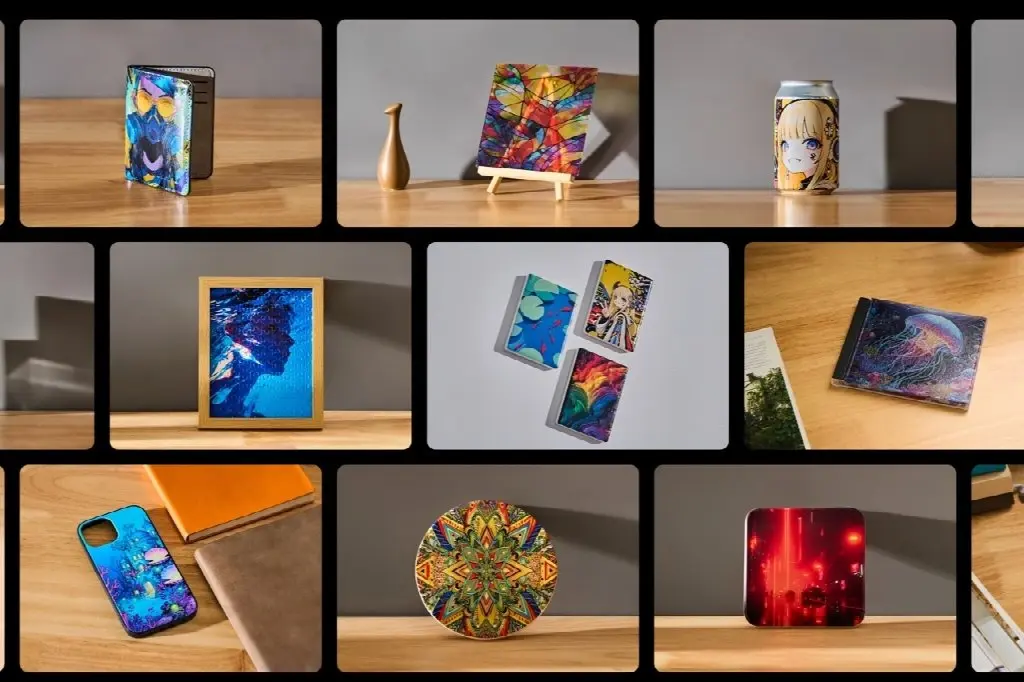
If you have an eye for good art, some creative ideas of your own, and you are looking for a simple, easy way to create artwork on wood, metal, glass, leather, and ceramics, UV printing is precisely what you need. UV printing lays vivid, textured, scratch-resistant graphics directly onto acrylic, wood, metal, glass, leather, and ceramic, and cures them instantly under UV light. There are no transfers and no minimum orders, and a desktop flatbed fits a studio, garage, or craft-fair table. But owning a printer doesn’t make money. Smart product choices and a tight workflow do. Here are five proven ways you can make money with a UV printer.
5 Ways To Make Money With a UV Printer
1. Customize And Sell Personalized Tumblers And Drinkware
With a rotary attachment, a UV printer can produce full wraps and raised textures on tumblers and mugs. The margins are strong. A $5 blank plus a few dollars of ink can realistically sell for 20-30+, especially with raised textures or custom names. Tumblers also batch well. Printing a dozen with identical settings beats switching materials job by job. Buy quality blanks, too. Cheap ones cause adhesion problems, reprints, and unhappy customers.
2. Consider Ornaments, Magnets, and Keychains At Craft Fairs
Wood and ceramic ornaments with 3D texture are consistent seasonal best-sellers. Priced at 10-20+, they can bring in 1,000-2,000 per season, which is roughly 67-133 ornaments at $15 each. Ceramic magnets and keychain blanks work the same way, and destination or “travel poster” designs sell especially well at fairs and tourist spots. The items are small, print fast, and have emotional appeal.
3. Signs, wall art, and faux stained glass
Wood, acrylic, and metal-coated signage is a natural fit. Landscape and national-park themes, family photos, and typography-focused designs sell well, and textured lettering or spot UV effects make easy upsells. For a premium product, print on clear or white acrylic and laser-cut it afterward to get a faux stained-glass look. Stay mindful of copyright with fan art or licensed imagery.
4. Prioritize Bulk B2B branded merchandise
Personalized gifts are fun, but business customers order in bulk and value fast turnaround. Common orders include branded tumblers, leather patches and journals, pens (with jigs), tins, keychains, event swag, and realtor gifts. One client ordering 100 tumblers or 250 keychains can equal weeks of individual Etsy sales, with far less admin. UV printers shine on short and mid runs of 10, 25, or 100 pieces. Group jobs by material, thickness, and ink setup, and use jigs for repeatable placement. Saved templates turn repeat orders into near one-click jobs.
5. Make Awards, Trophies, Coins, and Chips
Schools, sports teams, and corporate events all need awards. Stainless steel plates and wood bases with raised names and logos look premium. Textured brass or wood challenge coins command higher prices, and flat-printed poker chips stack properly for tournaments and branded sets. Personalizing on-site at an event is a powerful upsell.
The OMTech Spectra A3+: A UV Printer Made For Beginners in the Business
The OMTech Spectra UV Printer is a flatbed single/dual head printer built for small businesses that want professional results without industrial complexity. It’s available in single-head and dual-head versions. This printer is built for flat surfaces, and the rotary attachment for curved items like tumblers is planned for an upcoming batch at an expected price of $149.99. The warranty covers ink-free contact parts for 1 year and the printhead for 1 month, and it can operate in temperatures up to about 59-104°F and 40-60% humidity.
Key features
- Pricing and bundle: The Dual-Head Package is $3,999.99 (list $5,499.99), and the Single-Head Package is $2,999.99 (list $4,499.99). The dual-head bundle includes a free 500 mL CMYKWV hard UV ink set (6 bottles), a PU leather key fob pack, and an acrylic sheet pack.
- Generous print area: 13.8 × 17.7 in. (350 × 450 mm), larger than standard A3, on a honeycomb vacuum table. It handles items up to 5.5 in. (140 mm) tall, with IR auto height sensing.
- Detail and depth: The Epson F1080 printhead prints up to 720 × 1440 DPI with 99% color reproduction. The dual-head model adds varnish for one-click gloss, and layers stack up to 5 mm for 3D embossing, which is great for ornaments, coins, and plaques.
- Speed: It outputs up to 2.4 m²/hour, with a 400 mm/s head speed. That’s roughly 15 full-bed prints per hour on paper. Real-world speed will be lower when you add white, gloss, or embossing layers.
- Low ink costs: It uses an open ink platform with no proprietary cartridges, which OMTech says can cut ink costs by up to 75%. A 6 × 500 mL CMYKWV set is $199.99. At the spec-sheet consumption of 20 ml/m², a full-bed print costs about $0.21 in ink, though white and varnish layers add to that.
- Built-in maintenance: White ink circulation and agitation, automatic cleaning every 12 hours, and automatic nozzle moisturizing keep the printhead ready.
- Software that saves time: OMTech Print combines image editing, RIP processing, and printer control. Auto-layer mapping generates white and gloss channels, instant 3D embossing builds texture from flat art, and front-and-back printing works in one step.
- Materials: It supports 300+ materials, including acrylic, plastic, wood, leather, metal, glass, ceramic, canvas, and PVC.
- Safety: The inks are low-VOC and GREENGUARD Gold certified, and an air purifier with a carbon filter is built in.
- Laser pairing: Laser-cut or engrave first, then print color, then add varnish. That’s how you make the faux stained glass and layered awards from Part 1.
- Support: Support includes free remote tech help, 24-hour email support, and US-based service. You also get VIP WhatsApp guidance from unboxing to operation, free shipping protection, and a showroom demo if you want to see it first.
What the numbers could look like
Here’s an illustration using the figures above. Suppose each tumbler costs you about $8 all-in, with a $5 blank plus about $3 of ink and extras. At 20-30 each, a 100-tumbler corporate order brings in 2,000-3,000 in revenue and 1,200-2,200 in gross profit. By that math, two to three orders that size would cover the $3,999.99 dual-head package. These are planning figures, not earnings guarantees, and your results will depend on pricing, waste, labor, and demand.
The printer is built for flat surfaces, and the rotary attachment for curved items like tumblers is planned for an upcoming batch at an expected $149.99. The warranty covers ink-free contact parts for 1 year and the printhead for 1 month. The recommended operating environment is 59-104°F and 40-60% humidity.
Start with One Product, Then Scale
You don’t need to launch all five ideas at once. Pick the one that fits your local market, such as ornaments for fairs or branded tumblers for nearby businesses. Master the workflow, then add B2B orders and awards as demand grows. For more on structuring a UV business, see OMTech’s guide on how to make money with a UV printer. When you’re ready to start, the Spectra A3+ gives you the print area, speed, and low-maintenance reliability to do it.
Also Read
- https://smartsimiles.com/turning-down-the-volume-on-opioid-cravings-what-early-glp-1-studies-actually-found/
- https://smartsimiles.com/claude-sonnet-5-still-the-workhorse-a-year-later/
- https://smartsimiles.com/buying-thc-and-cbd-online-how-to-read-a-coa-decode-labels-and-shop-responsibly/







1 thought on “5 Ways You Can Make Money with a UV Printer<p class="post-updated-date">🕓 <span class="updated-label">Last updated on</span> <time datetime="2026-10-14T13:30:52+00:00">October 14, 2026</time></p><script type="application/ld+json"> { "@context": "https://schema.org", "@type": "BlogPosting", "mainEntityOfPage": { "@type": "WebPage", "@id": "https://smartsimiles.com/5-ways-you-can-make-money-with-a-uv-printer/" }, "datePublished": "2026-10-14T13:30:30+00:00", "dateModified": "2026-10-14T13:30:52+00:00" } </script>”